
One terminal. Every account.
Onyx is a futures trading platform built around the way prop traders work: several firms, several accounts, one screen. Here is everything inside it.
One login for every firm.
Prop traders often hold accounts at more than one firm, each with its own credentials and data feed. Onyx keeps every connection under one identity, so you switch accounts in a click instead of logging in and out of different platforms.
- Rithmic, Nexus Connect, ProjectX and Ironbeam connections
- Several connections at the same firm, each with its own nickname
- Workspaces that group accounts from one feed so you trade them together on one chart
TradingView, wired for trading.
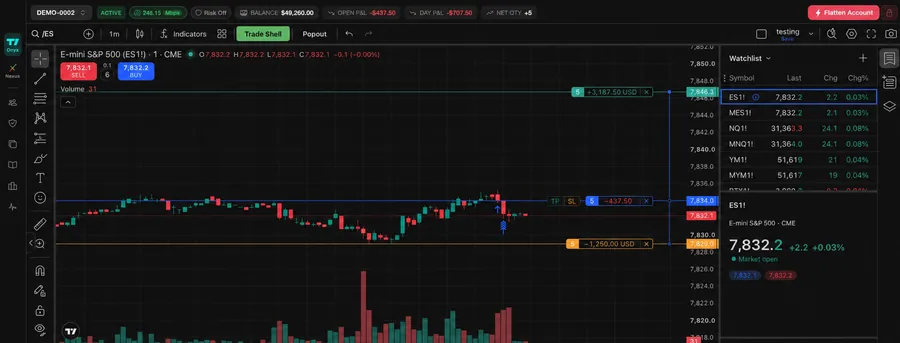
Onyx is built on TradingView's trading terminal. Your orders, brackets and positions draw on the chart, and you trade from it directly.
- Saved layouts, drawing tools and the TradingView indicator library
- Session volume profile on every chart
- Order panel, account manager and a market news panel
- A second popout window on Rithmic and ProjectX
A DOM and one-click order entry.
One-click trading is on from the start. Place orders from the DOM ladder or the chart, or open the Trade Shell for one-click market buys, sells and a flatten button.
- DOM ladder with your working orders, and full depth where your data includes Level 2
- Trade Shell with size presets and an invertible buy and sell layout
- Flatten an account in one click
Footprint with 37 signal detectors.
On Rithmic accounts, open any bar to see bid and ask volume at each price, the point of control, the value area, imbalances, delta and volume. Thirty-seven detectors mark the patterns you trade as they form.
- Time, volume, range, tick and renko bars
- Structure levels, volume bubbles and a session profile sidebar
- Trade directly from the footprint
Brackets, ATM and exits.
Enter with a target and a stop already attached, linked as one-cancels-other. Once you are in, drag either line on the chart to reprice it.
- Native brackets on Rithmic, Nexus Connect and ProjectX
- Multi-level brackets, bracket templates and a one-click break-even on Rithmic
- Per-trade ATM templates on Nexus Connect
- Trailing stops on Rithmic and Nexus Connect
Lead once. Mirror everywhere.
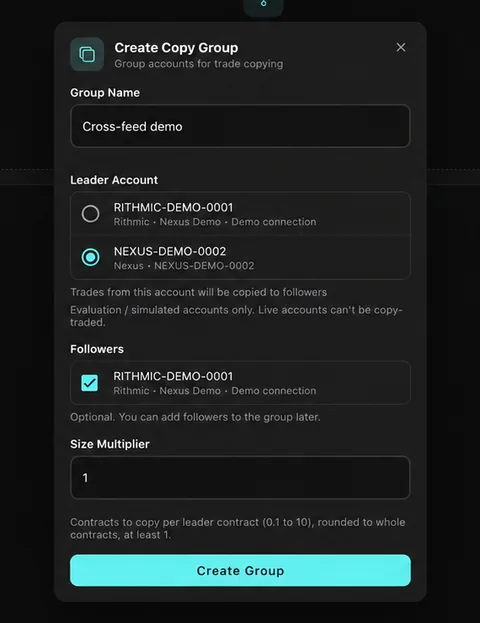
Build a copy group from a leader account and its followers, and every trade on the leader is mirrored onto the rest.
- Copy groups on Rithmic and Ironbeam accounts
- Cross-feed copying between Nexus Connect and Rithmic, mirroring position changes as market orders
- For simulated and evaluation accounts
Rules you set before the open.
Set a daily loss limit and a profit target for the day, then decide what Onyx does when one is hit. Apply the rules to everything, to one connection or to a single account.
- Liquidate and block, block only, or notify
- Lock yourself out for the rest of the day
- Rules scoped globally, per connection or per account
Review the day, with an AI coach.
Onyx builds your round-trip trades from your fills. Look back by calendar, read your stats, export to CSV and replay a trade on the chart where your connection supports it.
- Calendar, stats and CSV export
- Trade replay on supported connections
- An AI coach that reviews a trade or the whole day, using your own OpenAI, Anthropic, Groq or xAI key, or a small daily allowance included with Onyx
- A leaderboard ranked from verified broker fills
Browser, desktop and phone.
Onyx runs in any modern browser with nothing to install. The desktop app for Windows and macOS gives Onyx its own window and keeps itself up to date, and Onyx Mobile Trader brings your accounts to iOS and Android.
- Web app
- Windows and macOS desktop apps
- App Store and Google Play

Bring your accounts. Keep your edge sharp.
Create your Onyx account, connect the login your firm gave you and trade from one terminal.